


Payroll software for Singapore businesses
Officaid is payroll software built for Singapore businesses. It works out CPF for each employee by age band and PR year, adds SDL and the self-help group funds, submits CPF with your Corppass login, prepares the IR8A from your payslips under the Auto-Inclusion Scheme, and writes the salary file for your bank. When the bank has paid, the salaries go into your books, once.
From calculating salaries and deductions to generating bank payment files and government contribution reports, Officaid handles every step automatically through its built-in HR Rule Engine, ensuring perfect accuracy, compliance, and speed.
One platform. Zero chaos.
Listed One-Stop Payroll Vendor · Listed AIS payroll software vendor · SGD 30 per month for your first 5 employees on the yearly plan · 14-day free trial, no credit card
Start free trial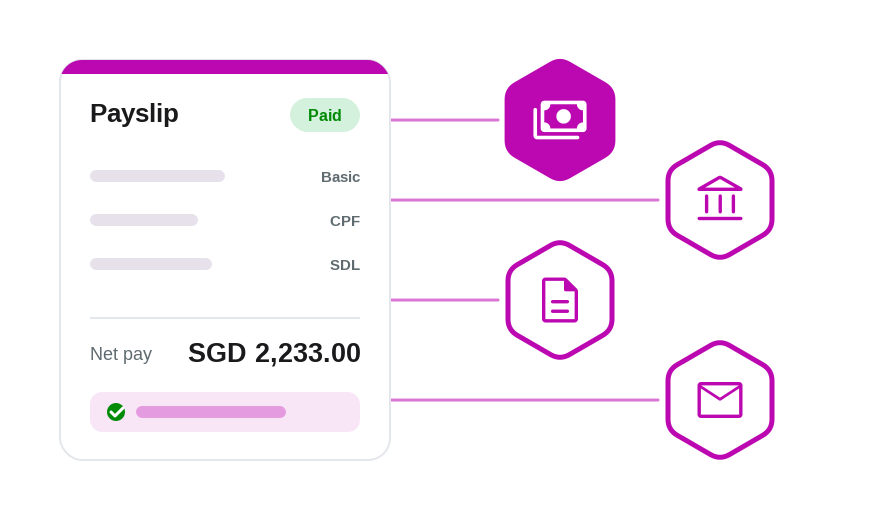
What Officaid does for your payroll
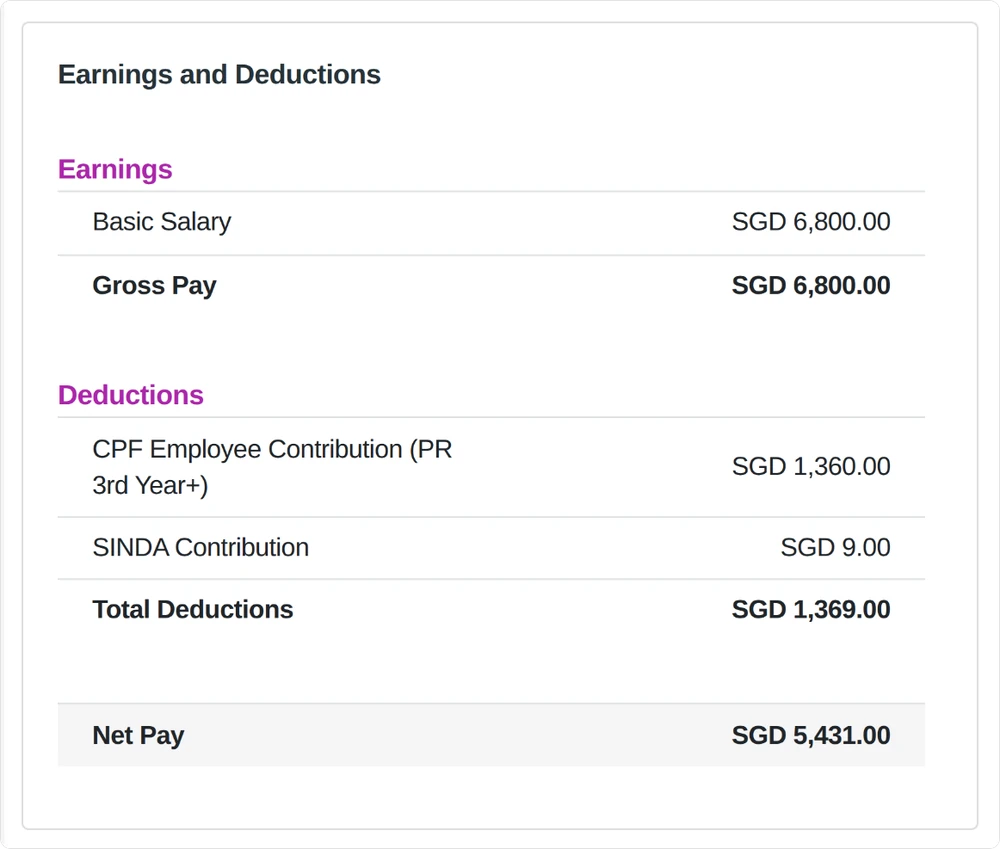
- CPF, worked out for you. Rates by age band, graduated rates for Singapore PRs in their first years, the SGD 8,000 Ordinary Wage ceiling, the Additional Wage ceiling for bonuses, and CPF Board's rounding.
- SDL and self-help funds (CDAC, ECF, SINDA, MBMF) on every payslip.
- CPF submission. Log in with Corppass and submit from Officaid, paying by PayNow, Direct Debit or MEPS. Prefer the CPF portal? Download the CPF EZPay file instead.
- IR8A under the Auto-Inclusion Scheme. One draft per employee from the year's payslips; review, then submit to IRAS with Corppass. Amendments come from the payslips too.
- Bank salary files for DBS, UOB, OCBC and J.P. Morgan, ready to upload to your bank's portal. Bank not listed? Tell us and we add it.
- Payslips for the whole team, emailed in one go; employees also see them in self-service, with leave and claims.
- Into the books. Mark the salaries as paid and Officaid posts them to your accounts, so payroll and the books agree.
- Switching mid-year. Enter what your previous payroll already paid this year, and bonuses later in the year get the right CPF.
- Joiners and leavers, pro-rated. Paid for the days they worked by MOM’s working-day formula, and the payslip says so.
- Unpaid leave by MOM’s rule. Deducted on its own line; a public holiday inside unpaid leave isn’t paid.
- No paying twice. Once the bank file is made, the rows read Sent to bank and stay out of the next file unless you choose to download them again.
First payroll on Officaid
A captioned demo: a new hire, the payroll run, the payslip and the bank file.
One-Stop Payroll system
Everything payroll needs in one place.
Officaid replaces the patchwork of:
- Payroll software
- Bank payment tools
- Government submission portals
- Spreadsheet-based workarounds
with one integrated system that manages the entire payroll lifecycle end-to-end:
- Employee salary processing
- Allowances & deductions
- Statutory contributions
- Bank payment generation
- Government reporting & submissions
- Payslip distribution
No exports between systems. No reconciliation gaps.

Ultra-fast payroll processing
Run payroll in a few clicks.
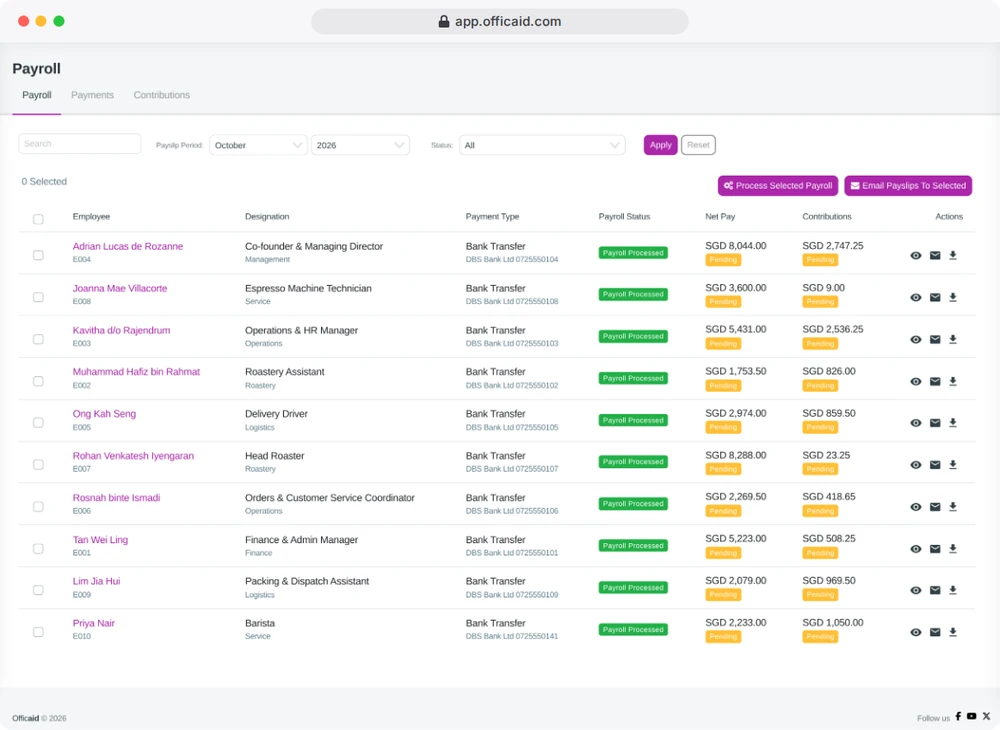
Your payroll dashboard allows you to:
- Select pay periods
- Review salary calculations
- Process payroll for individual or bulk employees
- Finalize payables instantly
Every employee’s net pay and deductions calculate automatically ready for payout in seconds.
Automated bank payments
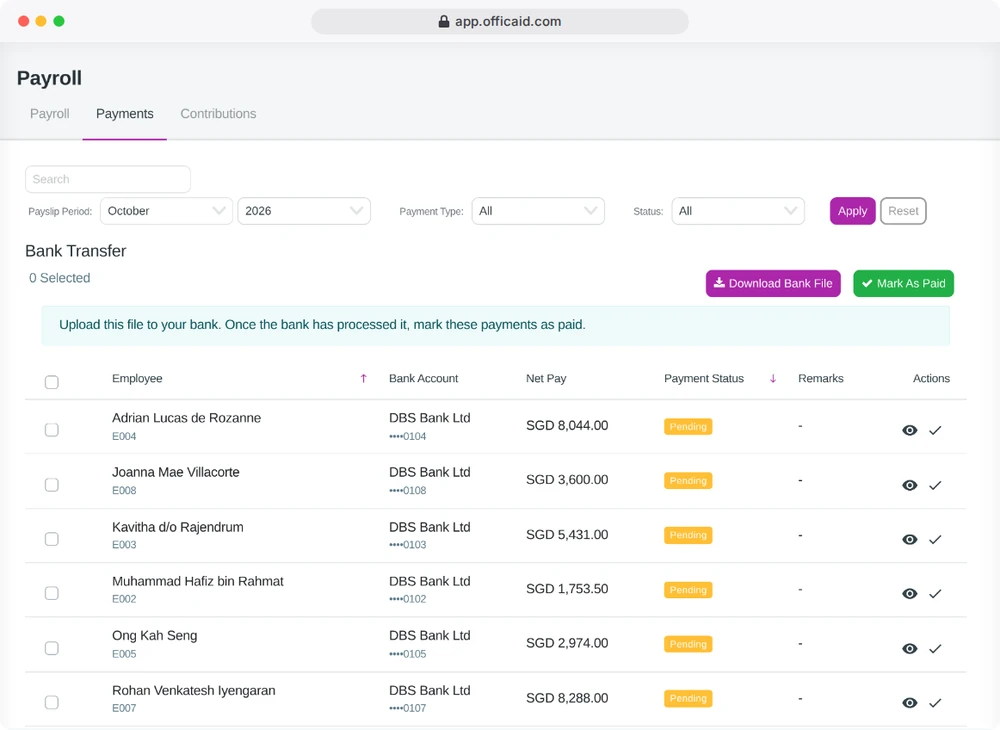
Move from calculation to payment instantly.
Pay the whole team with one bank file. Tick the staff paid by bank transfer and Officaid writes the salary file in your bank's format, ready to upload to its portal; many banks are supported. Once the bank has paid, Mark as paid books the salaries in your accounts, once.
Your payment records sync automatically back into payroll and accounting, ensuring perfect audit trails across cash flow and expense accounts.
Built-in HR rule engine
Payroll logic that adapts to real-world complexity.
Officaid’s HR Rule Engine powers everything behind the scenes — translating national payroll laws and company policies into real calculations.
What the rules cover
All rules are applied automatically, consistently, and accurately across every payroll run.
No trainee headcount calculations.
No manual government formula lookup.
Statutory contributions
Full compliance, built in.
Officaid calculates both employee and employer contributions according to local regulations.
No separate portals. No third-party vendors.
Switching in the middle of the year
Moving to Officaid after January? On each employee’s Salary Progress card, add the Ordinary and Additional Wages subject to CPF that your previous payroll already paid this year. Officaid counts them in the year’s Additional Wage ceiling, so a bonus later in the year gets the right CPF.
Direct government files & submissions
Submission-ready outputs, instantly.
From your Contributions dashboard, you can trigger government uploads.
All data is pre-validated to prevent rejected filings and costly errors.
First payroll to CPF submission
CPF, submitted from payroll: sign in once with Corppass, submit to CPF Board via API, and keep the Accepted receipt on every payslip.
After every run
Payslips go out and every step is recorded.
Payslip automation
Automatic document creation & delivery.
Upon payroll completion:
- Payslips are instantly generated
- Employees receive secure digital copies
- Payslips remain permanently accessible from employee profiles
No printing. No email attachments chaos. No manual uploads.
Full payroll audit trails
Compliance by default.
Every payroll process produces a full audit record showing:
- Who processed payroll
- When salaries were approved
- Which rules were applied
- What files were generated
- When payments and submissions were completed
This creates a transparent end-to-end audit chain, critical for regulatory inspections, tax audits, and internal controls.
Role-based access controls
Security built into workflows.
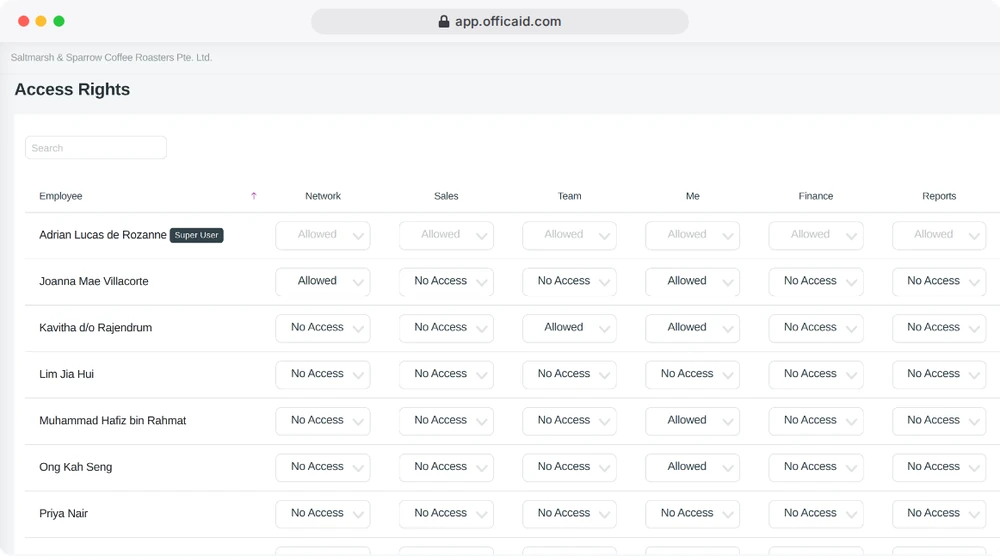
Different roles see only what they need:
- HR teams manage employee profiles
- Finance controls payroll processing
- Management views payroll summaries
- Employees view personal payslips only
Sensitive salary data stays protected while collaboration remains smooth.
Real-time accounting sync
Payroll directly powers financial reports.
Every payroll run automatically feeds into:
No manual journal entries. No reconciliation cleanup.
Your financial reports stay continuously accurate.
Frequently asked questions
What is payroll software for a Singapore business expected to do?
Work out CPF by the employee's age and residency, add SDL and the self-help group funds, produce payslips, pay the team through the bank, submit CPF, and report the year's income to IRAS as IR8A. Officaid does all of these, and puts the result into your accounts.
Does Officaid calculate CPF contributions?
Yes. Officaid applies the 2026 rates by age band, the graduated rates for Singapore PRs in their first years, the SGD 8,000 Ordinary Wage ceiling, the Additional Wage ceiling for bonuses and CPF Board's rounding, on every payslip.
Can I submit CPF contributions from Officaid?
Yes. Log in with Corppass, pick PayNow, Direct Debit or MEPS, and submit from the Contributions tab. You can also download the CPF EZPay file and upload it on the CPF portal.
Is Officaid a listed One-Stop Payroll Vendor?
Yes. Officaid is a listed One-Stop Payroll (OSP) vendor.
Can Officaid submit IR8A to IRAS?
Yes. Officaid is a listed AIS payroll software vendor. It prepares one IR8A per employee from the year's payslips and submits them to IRAS under the Auto-Inclusion Scheme with your Corppass login. For income year 2026 (YA 2027) the deadline is 1 Mar 2027.
Does Officaid handle SDL and the self-help group funds?
Yes. SDL and the CDAC, ECF, SINDA and MBMF contributions are worked out on every payslip and submitted with your CPF.
Which banks can I pay salaries through?
Officaid writes salary files for DBS, UOB, OCBC and J.P. Morgan, ready to upload to the bank's portal. If your bank is not listed, tell us and we add its format.
Do employees get payslips?
Yes. Payslips are emailed to the whole team at once, and each employee can see their own in self-service, where they also apply for leave and submit claims.
Can I switch to Officaid in the middle of the year?
Yes. Enter the Ordinary and Additional Wages your previous payroll already paid this year on each employee's Salary Progress card, and Officaid counts them for the year's Additional Wage ceiling.
How much does Officaid cost?
SGD 30 per month for your first 5 employees, billed yearly (SGD 360 a year), and SGD 5 per month for each extra employee. Month to month it is SGD 50 for the first 5 and SGD 6 for each extra employee. Every feature is included, from payroll to invoicing and accounts, with a 14-day free trial and no credit card.
Work out your payroll in Officaid: start the 14-day free trial. No credit card is needed.
Start free trialThe strategic advantage of rule-based payroll
Payroll is never simple. Laws change, headcounts fluctuate, employment types evolve.
Officaid eliminates payroll risk through automation and rule normalization — replacing fragile spreadsheets and disconnected vendors with a single intelligent payroll engine.
Start free trialNo credit card required · 14-Day free trial