


Since 2 Nov 2026, IRAS has been paying the SME Cash Grant 2026 into business bank accounts across Singapore. If a credit from IRAS appeared on your statement this month, this guide explains what it is, what it means for your tax, and how to record it so your books and your bank agree.
What the grant is
IRAS describes the grant as support for businesses facing higher energy prices and cost increases arising from the Middle East situation. It is part of the second support package the Government announced on 29 Jul 2026. There is no application: IRAS assesses every ACRA-registered company, sole proprietorship and partnership (limited liability and limited partnerships included) automatically.
IRAS lists these criteria. A business must:
- be active and registered in Singapore, and still active when the grant is paid in Nov 2026; and
- have an annual revenue of no more than SGD 100 million for the Year of Assessment (YA) 2025, or employ no more than 200 employees as at 30 Jun 2026.
Individuals who employ workers in their personal capacity, under their NRIC, are not eligible. Your IRAS letter tells you whether your business receives the grant, and how much.
How much, and how it is paid
| Business | Amount (IRAS) |
|---|---|
| Company with local qualifying employees | SGD 500 for each local qualifying employee, up to SGD 2,500 |
| Sole proprietorship or partnership with local qualifying employees | The same: SGD 500 each, up to SGD 2,500 |
| Sole proprietorship or partnership with no local qualifying employee | A flat SGD 500, if the local business owner's net trade income for YA 2025 was SGD 100,000 or less (for a partnership, at least one partner's) |
| Company with no local qualifying employee | No grant |
Local qualifying employees are Singapore Citizens and Permanent Residents, shareholder-directors of a company included; sole proprietors and partners do not count as employees. IRAS counts the highest number in any month from Apr to Jun 2026, and only employees whose CPF contributions were paid on time.
IRAS pays by GIRO or PayNow Corporate, never by cheque. Businesses with a GIRO arrangement with IRAS as at 14 Oct 2026, or registered for PayNow Corporate as at 25 Oct 2026, receive it from 2 Nov 2026. For a sole proprietorship with neither, IRAS pays the grant to the sole proprietor's PayNow NRIC by 30 Nov 2026. Eligible businesses also get a letter at their registered address and in myTax Portal during November.
Is it taxable?
Yes for income tax. IRAS states that the grant is taxable:
- Companies declare it in their income tax return (Form C, C-S or C-S (Lite)).
- Sole proprietors and partnerships: IRAS includes it automatically (Form B or P).
No GST. IRAS treats an outright grant, where you give the grantor nothing in return, as not subject to GST. So you charge no GST on it and it does not go into your GST return as a supply.
How to record it in your books
The grant is money in that did not come from a sale, so it belongs under other income, in its own category:
- Create an income category such as Government Grants (once; you can reuse it for future grants).
- Record the grant on the date it reached your bank, for the amount on your statement, with a note such as "SME Cash Grant 2026 (IRAS)".
- If you are GST-registered, mark it as outside GST.
- Match it to the bank credit, so your book balance and your bank balance agree.
Its own category keeps it easy to find when you prepare your tax return, and it shows as other income on your Profit & Loss (P&L) for the year.
In Officaid: one step from your bank statement
In Officaid you can record the grant, keep it outside GST and match it to the bank credit in one go, straight from the bank statement:
- Go to Finance → Accounts, open the bank account that received the grant, and upload your statement on the Transactions tab.
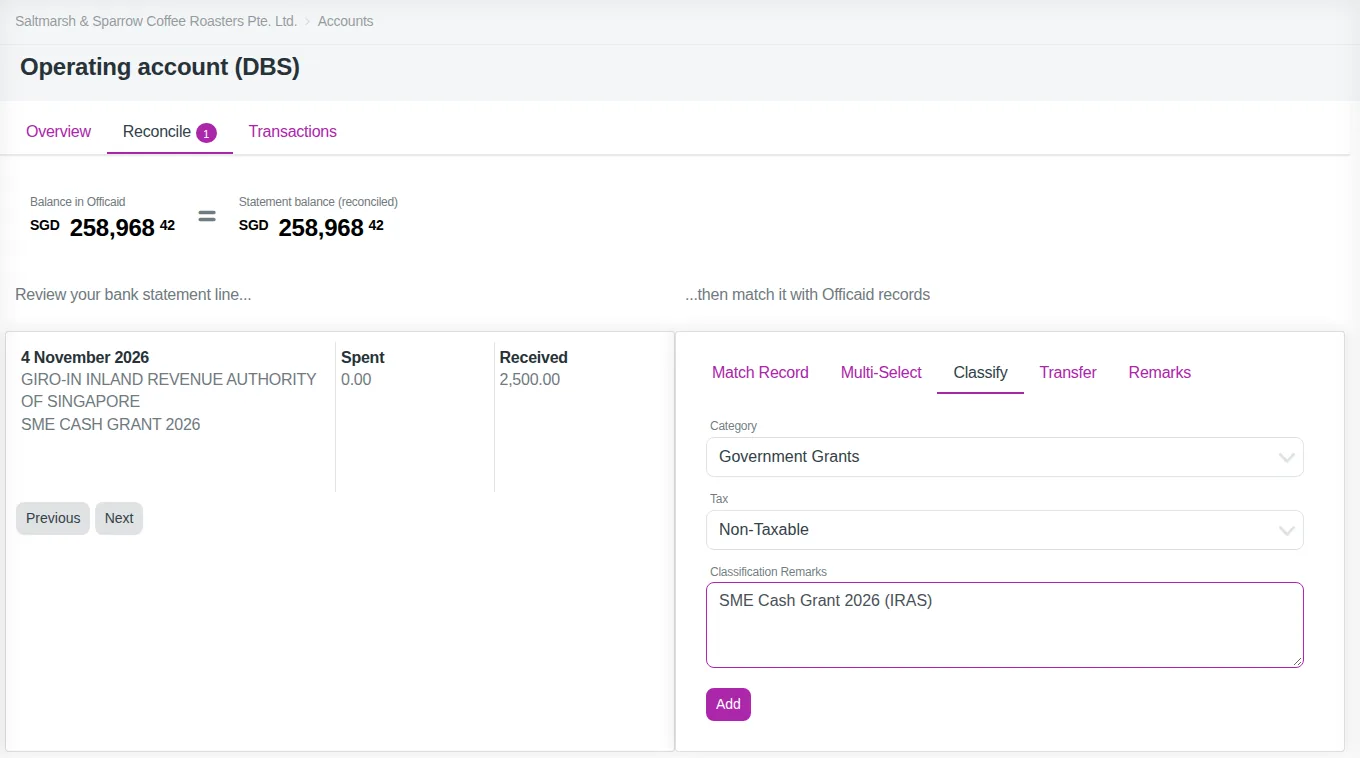
- On the Reconcile tab, click Next until the IRAS line shows. It has no record yet, so the Classify tab opens by itself.
- In Category, add Government Grants (once). If your company is GST-registered, leave Tax at Non-Taxable (no GST). Add the remark SME Cash Grant 2026 (IRAS) and click Add.
Officaid creates the Other Income record, dated the day of the bank line, and marks the line as reconciled.
The full steps, including what to do if you recorded the grant first, are in our help article Recording the SME Cash Grant 2026.
Did not receive it?
Check your business with IRAS's SME Cash Grant 2026 eligibility checker in myTax Portal. If the checker shows your business is eligible, the usual reason is that no GIRO or PayNow Corporate was set up: IRAS explains on its page how to set one up and ask for the payout again. IRAS may also use the grant to pay overdue tax, and tells you by letter. If you believe you qualify but the checker says otherwise, IRAS takes appeals from 2 Nov 2026 to 7 Jan 2027 at go.gov.sg/smecgappeal. IRAS says appeals after 7 Jan 2027 are not considered.
Received it but not eligible?
IRAS lets a business return the grant if it was paid on incorrect information or the business does not need the support. The payment details and the reference to use are on the IRAS SME Cash Grant 2026 page.
Keep your books and your bank in one place
Officaid records income, expenses and grants, reconciles your bank, and runs Singapore payroll with CPF, in one app. Start a 14-day free trial: full access to all features, no credit card needed.
Facts on the grant are from IRAS (the SME Cash Grant 2026 page, last updated 12 Nov 2026, and Receiving Grants for GST) and the Singapore Budget site, read on 27 Nov 2026. This guide explains the bookkeeping; for your own tax position, check with IRAS or your tax adviser.
Read more: Bank reconciliation · SDL and self-help group funds